Python on NixOS: A Guide for the Challenged
Introduction
Everyone and their mother uses NixOS now (Firebase and Railway too). Time to get to work and stack some paper since you spent your savings on that akasupa to the graduated VTuber(s) who you were parasocial for. So, you quickly install Python from the nixpkgs and then make your first import. The terminal shits out import errors from locations you never imagined existed on your system. WHAT THE HELL IS A NIX STORE!!! “Worked fine on my Arch install!!!”, you think. Buckle up rookie! I will what I wish I was told 8 months ago.
My fella, do you need the method?

Let’s go with the simplest way I know (the non-Nix route) and let’s set up a reproducible Python environment using Nix, uv. You’ll finally be able to hopefully get your money up and not just your funny up. This involves exposing system libraries to python packages in the nix shell.
Prerequisites
- NixOS installed (socially inept simulator)
- Your project should have a
requirements.txt, and your Python source files (tf you doing here if you don’t).
Using nix-shell and uv
Step 0: Create a shell.nix File
Create a shell.nix file in your project directory with the following content:
{ pkgs ? import <nixpkgs> {} }:

pkgs.mkShell {

  packages = [
    pkgs.python310 # or whatever version you use
    pkgs.uv
    pkgs.stdenv.cc.cc
  ];

  env.LD_LIBRARY_PATH = pkgs.lib.makeLibraryPath [
    # these are the most common
    pkgs.stdenv.cc.cc.lib
    pkgs.zlib
  ];
}
Step 1: Enter the Nix Shell

Open your terminal in the project directory and type:
nix-shellThis loads a reproducible shell with Python and uv, as dictated by your shell.nix. If it fails, honestly, you are cooked.
Step 2: Create and Activate a Virtual Environment

Let uv cook:
uv venv
source .venv/bin/activate
If your prompt doesn’t change, it’s either working or it’s not (my zsh config is dogshit).
Step 3: Initialize the Project (Optional)
If you are chatgpt-ing the shit outta your projcet, you might get prompted to generate a pyproject.toml:
uv initSo much for industry practices.
Step 4: Install Dependencies
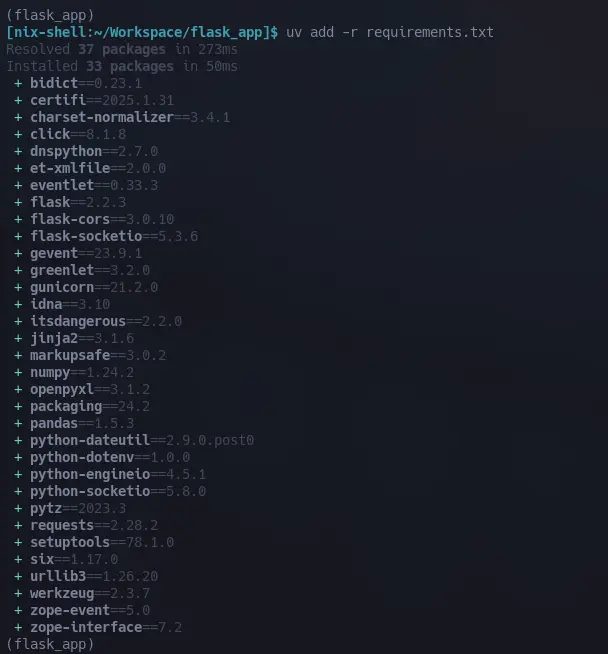
Time to summon your packages:
uv add -r requirements.txtThis will (hopefully) resolve and install everything. If it doesn’t, check your requirements.txt for typos, or find the nix-tards on reddit.
Step 5: Run Your Python Application

Cross your heart and run the code:
uv run app.pyOr, if you’re feeling retro:
python app.pyOr if you just want to see something work:
python main.pyUsing nix-direnv
Step 0: Create a shell.nix File
Create a shell.nix file in your project directory with the following content:
{ pkgs ? import <nixpkgs> {} }:

pkgs.mkShell {
  buildInputs = with pkgs; [
    python3
    python3Packages.flask # whatever packages you need
    python3Packages.flask-cors
    python3Packages.pandas
    python3Packages.numpy
    python3Packages.openpyxl
    python3Packages.requests
    python3Packages.python-dotenv
    python3Packages.gunicorn
    python3Packages.werkzeug
    python3Packages.pytz
    python3Packages.eventlet
    python3Packages.gevent
    python3Packages.flask-socketio
  ];

  # shellHook = ''
  #   echo "Python Flask environment activated!"
  #   echo "Run 'flask run' to start the development server"
  #   echo "Run 'gunicorn app:app --bind 0.0.0.0:\$PORT' for production"
  # '';
}
Step 1: Install direnv
For NixOS 23.05+, add this to your configuration.nix:
{ pkgs, ... }: {
  #set to default values
  programs.direnv = {
    package = pkgs.direnv;
    silent = false;
    loadInNixShell = true;
    direnvrcExtra = "";
    nix-direnv = {
      enable = true;
      package = pkgs.nix-direnv;
    };
  }
Step 2: Enable direnv in your project directory
$ echo "use nix" >> .envrc
$ direnv allow
Step 3: Run your Python application
$ python app.pyTroubleshooting
- Make sure you are in NixOS
- Make sure your keyboard is connected (HHKBs work best in my testing)
- Is your monitor on?
- Make sure you’re in the nix-shell and virtual environment before installing or running code.
- If dependencies fail to install, check your
requirements.txtand Python version. Or try turning it off and on again. - Still broken? Wallahi your bloodline is finished with you and your ancestors weep in shame.
Congrats! You’ve now set up Python on the autism simulator that is NixOS. Go forth and break something new!
Cheers!
quiet🌸